Leaving Texas was easy. Losing my very first, very own office space was difficult. I finally had an entire room solely for productivity and creativity, though not always in practice simultaneously. Other than the door that I could close when needed, my absolute favorite quality of that space was the light, I noticed it upon first walking in. The window faced west so the afternoon sun kept the room bright and the evening setting sun flooded it with soft, golden light. Enterprise loved the sun-warmed carpet patches and rolled with them throughout the day. The window framed beautiful sunsets on the horizon but if you dropped your gaze any lower the ant mounds and weeds quickly reminded you of your location.
Our attached house in Japan is about as large as the one we left in Texas but it is older and laid out completely different. It has two stories, one bathroom, and lots of walls with oddly placed and strangely spaced closets. The largest difference though is that instead of three bedrooms (a master and two offices) it has two bedrooms and a formal dining room. This new configuration led to compromise.
Since we have infrequent need of a dedicated formal dining room my new office shares that space. Figuring out how to combine the two functionally and aesthetically has been a challenge, including litter box placement, wall outlet locations, and remembering that the heating and cooling unit installed near the ceiling may leak (meaning no computer under it). I also considered lines of sight from the living room, front door entrance, as well as from outside through the front, double windows.
I’ll show the progression.
First, after assembling my new desk:
Then after the arrival of our household goods:
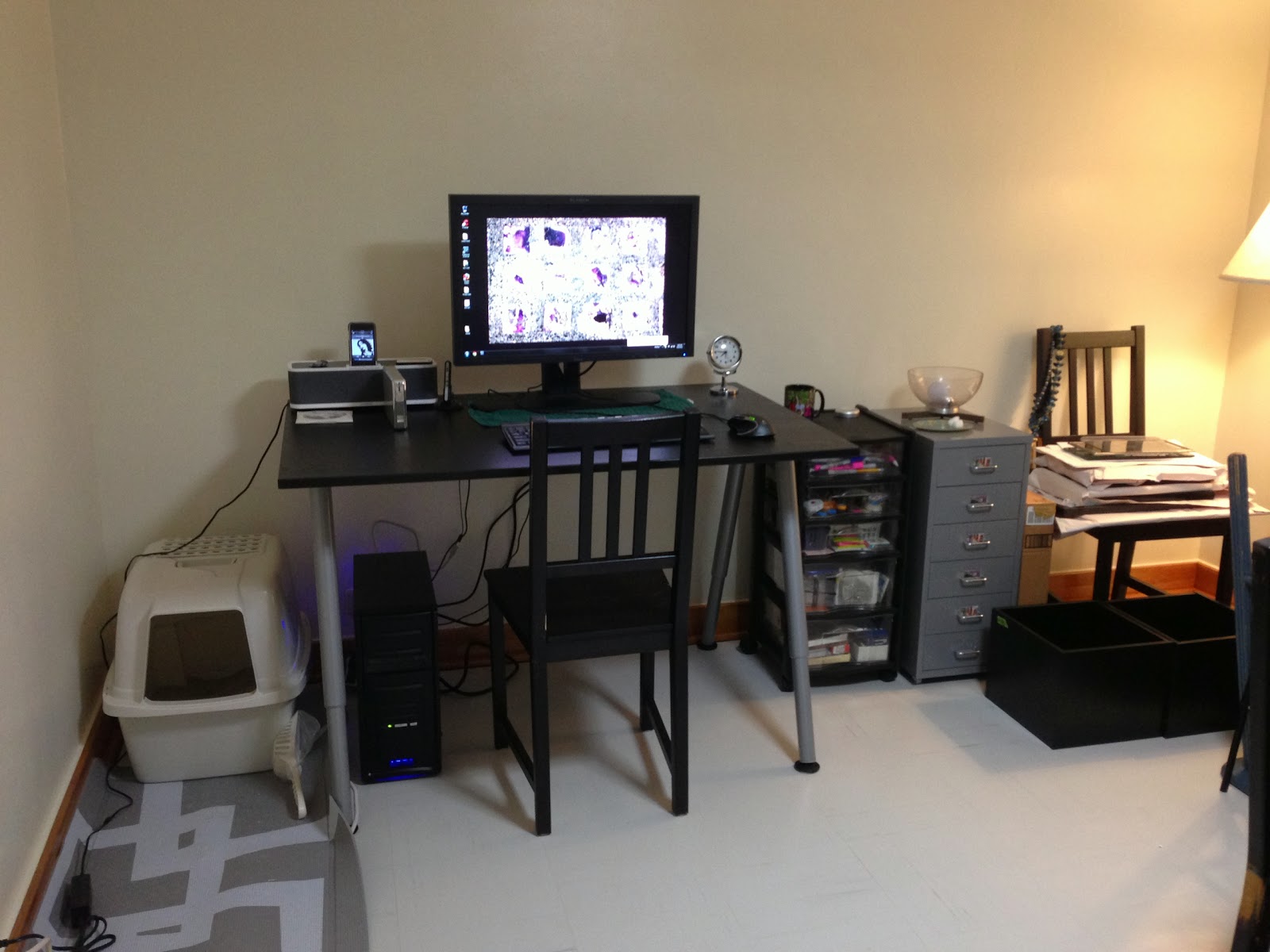
And the current, mostly final design:
To understand the space, the camera is set up in the back corner, at the kitchen entrance; to the right is the doorway to the living room. There is an actual door there that I can shut if I want to block out television noise from the living room or contain my noise in my office or kitchen. It is quite nice.
By choice, we do not have large dining room furniture. The table you see to the right is from a restaurant booth so it is incredibly durable, cleans up well, and has a simple, central pedestal support. The surface is a great, medium brown wood grain that fits with most décor, it repositions easily around the room, and also allows for a second work surface.
The desk is from Ikea’s Galant workspace series and, at 80x120 cm, is approximately the same size as the dining table. The deep top is appropriate for the large monitor I have, the simple legs are fully adjustable, and the series includes many components I can add later. It is very versatile and can work in many areas of the house if needed, especially because it is in the same black-brown color as most of our Ikea purchases. Speaking of, the chairs (and chair pads) are also Ikea, the inexpensive Stefan style in the same color, though I see the price has increased since we purchased two in Washington state and two in Texas. Using one as my desk chair helps unify the room.
The workhorse piece in the room is the tall Billy bookshelves from, you guessed it, Ikea, in the same color; we actually scored these off Craigslist, brand new, in the box, for half of the original selling price. They were formerly used as my husband’s bookshelves in our last living room and are the only large shelving we brought with us. Since our living room here has nice built-in shelves I commandeered them for my space. Offices collect small supplies and clutter and keeping the shelves neat is a priority because of its highly visible location. So I gathered my beloved kitchen tins to double as storage and decoration – I love it! The small, brown boxes are inexpensive purchases from Ikea I used in my former office and the minty green boxes were displays at Nitori that I just scored for 479¥/$4.89 for the set. The messier looking items are on the lower shelves and I still have to figure out a plan for them but for now it’s acceptable.
Secondary storage is still a work in progress. The silver, metal Helmer drawer storage (from Ikea) holds my miscellaneous photography gear. Shoved in the right corner (under the heating/cooling unit) are my old, busted up, plastic Rubbermaid storage drawers for my office supplies that sit atop an old, broken, stack-a-shelf drawer for my tools. The lacquered wood piece is actually a checker board on one side and usually leans in front of them to hide the ugliness. Since both sets of drawers are usable I am not replacing them but am hoping to somehow refurbish them, I’m thinking spray paint or Contact paper.
Hidden behind the dining table to the right are some plastic file crates, a few small boxes of unframed photos, and the few framed photos I brought are still sitting on the chair on the opposite side of the table. Unseen to the left in the overview photo are a few black stack-a-shelves that are waiting for a clear purpose. I also still have a couple unused white stack-a-shelves upstairs but will probably not use them in this room for aesthetic reasons.
The two black and cream rugs were purchased on super-low clearance at Sears about four years ago and only used lightly in Texas in our entry area. I love them, they add a layer of texture to the area and also helps define the space as separate from the dining area.
The ceiling lamp is fluorescent and gives off a horrible, cool tone light. Eventually I plan on replacing the bulbs with a set of warm fluorescent bulbs I saw at a local home store but it’s not a priority because I have the two incandescent floor lamps. The ugly, gold lamp is a loaner but it gives such soft, warm light that it’s staying. I am looking for something to wind up the pole and cover the gold but have not found anything yet, hopefully soon.
Lastly, I am considering window treatments. If I put up anything it will be simple, white sheer panels which are my curtains of choice. My hesitation is that too much light will be blocked. The windows face north/northwest and what little light comes in is mostly shaded by the plentiful, mature trees in the neighborhood. Light is everything so I am weighing my options carefully.
Photo three:
2013.10.16.
[Canon EF-S 18-135mm f/3.5-5.6 IS UD]
Photos four through seven:
2013.10.19.
[Canon EF 50mm f1.4 USM]
Showing posts with label computer. Show all posts
Saturday, October 19, 2013
Saturday, October 5, 2013
New Tool for Black and White.
Silver Efex Pro, from Nik Software.
I wanted this software so bad but could never justify spending over $100 on plug-ins. I also wanted a Wacom Tablet as a mouse alternative to avoid overuse of my hands but, again, cost consistently trumped purchase. Then I found the combination package on Amazon, sold by Adorama, for $130. Happy birthday to me!
That was in January. The following months were difficult for me, I had little time and even less focus. Then came time to prepare and navigate an overseas move and even more time passed waiting for our household goods to arrive. Now most of the unpacking is done and the time has arrived to play with my gift.
Today I unboxed and installed the Wacom Tablet and all the included processing and editing software. I saved Silver Efex for last because I was most excited about it and knew I wouldn't get to anything else if I did it first. I chose a recent photo that I skipped over previously because I didn't think I would get my desired results through Lightroom 3, the processing software I currently use and really like despite the learning curve.
This side-by-side comparison may not impress depending on the monitor/screen you are viewing it on, but on my lovely monitor it is splendid. I am not able to define every change, mostly because I was just playing around. I wanted to keep the contrast but in a softer manner, bring out the detail in the writing, and lighten some shadows but retain the black background. I'm not sure if the final image is print-worthy but it is certainly share-worthy, especially in comparison to the untouched original on the left.
After that experiment I really wanted to play so I went back to photos from my sisters' visit to Texas in March to look for a portrait possibility. This is where I hit a roadblock. While we were prepping my desktop computer for shipping priority number one was backing up. Since my husband built the computer I wanted him to work with it and I generally I trust his tech skills over mine.
My computer has two internal hard drives (238GB and 931GB) and one external (big, but it's not plugged in right now for a size reading). My workflow and storage system has been acceptable but I've never been extremely satisfied and hence change it around every couple years. I must find a smart, solid, and consistent method though because apparently mine isn't quite there yet. Without going into detail (maybe a future post?) my main storage folder was moved from the C drive to the D drive during the back-up process which disconnected all my photo files from Lightroom. In simple terms, the software could not find my photos because they moved without a forwarding address. And instead of filling out one change of address form I had to tell Lightroom where each and every folder was. Once I figured out how to fix it (ugh!) it was simple to make the connections. I'm happy my photo club is discussing workflow at the next meeting because I need some improvement.
Once I could access my older folders through Lightroom again I just quickly chose one to experiment with.
This isn't a portrait, obviously, but it's a photo from January I thought had great potential but couldn't bring out through Lightroom alone so I dropped it. I wanted to enhance both the smooth, waxiness of the leaves and their gorgeous, contrast gradation. With Silver Efex Pro I was able to do that. The incredible amount of control you have over every detail is exhilarating. The depth of tools available allow so much room for variations that if there is any slight change you want there is an option to adjust it. If it wasn't midnight already I would work on another example to share. Maybe once I work on a portrait I'll save some settings as an example.
I only played with the Wacom Tablet for a small time, not enough to form an opinion, but this software excited me enough to stay up late and share.
*Post Edit*
Viewing this on my laptop screen is completely underwhelming so I understand if you look at the photos with question and doubt. Come on over to my place, I'll show you what I mean.
I wanted this software so bad but could never justify spending over $100 on plug-ins. I also wanted a Wacom Tablet as a mouse alternative to avoid overuse of my hands but, again, cost consistently trumped purchase. Then I found the combination package on Amazon, sold by Adorama, for $130. Happy birthday to me!
That was in January. The following months were difficult for me, I had little time and even less focus. Then came time to prepare and navigate an overseas move and even more time passed waiting for our household goods to arrive. Now most of the unpacking is done and the time has arrived to play with my gift.
Today I unboxed and installed the Wacom Tablet and all the included processing and editing software. I saved Silver Efex for last because I was most excited about it and knew I wouldn't get to anything else if I did it first. I chose a recent photo that I skipped over previously because I didn't think I would get my desired results through Lightroom 3, the processing software I currently use and really like despite the learning curve.
This side-by-side comparison may not impress depending on the monitor/screen you are viewing it on, but on my lovely monitor it is splendid. I am not able to define every change, mostly because I was just playing around. I wanted to keep the contrast but in a softer manner, bring out the detail in the writing, and lighten some shadows but retain the black background. I'm not sure if the final image is print-worthy but it is certainly share-worthy, especially in comparison to the untouched original on the left.
After that experiment I really wanted to play so I went back to photos from my sisters' visit to Texas in March to look for a portrait possibility. This is where I hit a roadblock. While we were prepping my desktop computer for shipping priority number one was backing up. Since my husband built the computer I wanted him to work with it and I generally I trust his tech skills over mine.
My computer has two internal hard drives (238GB and 931GB) and one external (big, but it's not plugged in right now for a size reading). My workflow and storage system has been acceptable but I've never been extremely satisfied and hence change it around every couple years. I must find a smart, solid, and consistent method though because apparently mine isn't quite there yet. Without going into detail (maybe a future post?) my main storage folder was moved from the C drive to the D drive during the back-up process which disconnected all my photo files from Lightroom. In simple terms, the software could not find my photos because they moved without a forwarding address. And instead of filling out one change of address form I had to tell Lightroom where each and every folder was. Once I figured out how to fix it (ugh!) it was simple to make the connections. I'm happy my photo club is discussing workflow at the next meeting because I need some improvement.
Once I could access my older folders through Lightroom again I just quickly chose one to experiment with.
This isn't a portrait, obviously, but it's a photo from January I thought had great potential but couldn't bring out through Lightroom alone so I dropped it. I wanted to enhance both the smooth, waxiness of the leaves and their gorgeous, contrast gradation. With Silver Efex Pro I was able to do that. The incredible amount of control you have over every detail is exhilarating. The depth of tools available allow so much room for variations that if there is any slight change you want there is an option to adjust it. If it wasn't midnight already I would work on another example to share. Maybe once I work on a portrait I'll save some settings as an example.
I only played with the Wacom Tablet for a small time, not enough to form an opinion, but this software excited me enough to stay up late and share.
*Post Edit*
Viewing this on my laptop screen is completely underwhelming so I understand if you look at the photos with question and doubt. Come on over to my place, I'll show you what I mean.
Subscribe to:
Posts (Atom)


